

Join your club
Add your registration number, then join your club from the club search or with an invite from someone who runs it. A club gives roles on its events to its members; Club roles on the Roles and permissions page lists them.
Before you begin
Section titled “Before you begin”- An OResults account. See Getting started.
- Your registration number: a Czech (ČSOS) number such as
ABC8617, or your IOF number.
Add your registration number
Section titled “Add your registration number”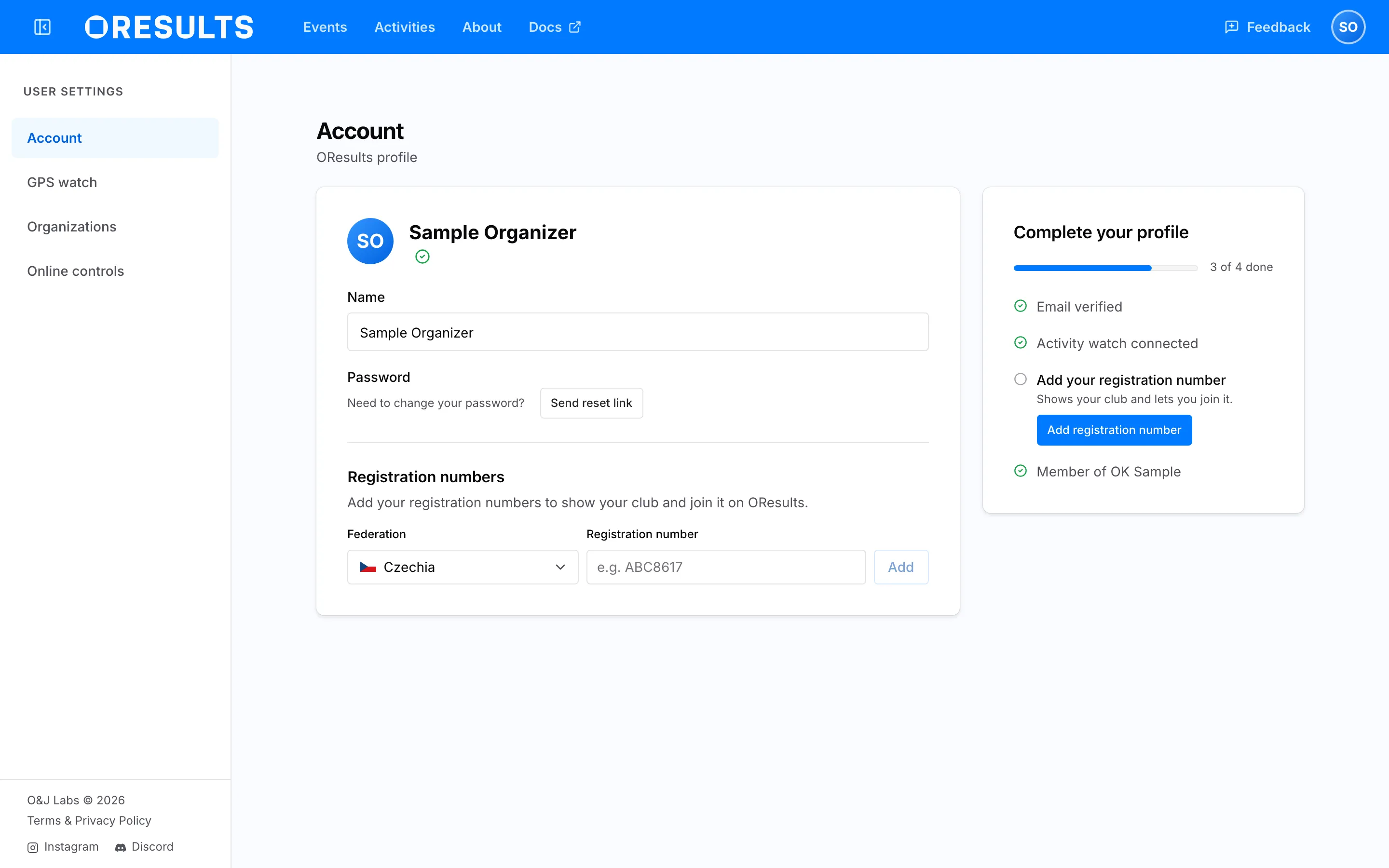
- Open your account menu (the avatar at the top right; on a phone, Account in the menu) and choose Account.
- Under Registration numbers, pick your Federation: Czechia or IOF. For any other country, pick Other country…, which opens Feedback with a request to add it.
- Type the number into Registration number and choose Add. A Czech number is three letters and four digits; an IOF number is digits only. If it says invalid value for this identity type, check the number against that format and the federation you picked.
Once one number is on file, the form hides behind + Add registration number.
If the card beside your profile asks Are you or Is one of these you?, choose the That’s me button that shows your own number. Names repeat, so compare the number, not the name.
What ORIS verification does
Section titled “What ORIS verification does”ORIS, the Czech orienteering registry, can confirm that a Czech number is yours. OResults sends it your name and the email address you log in with, so the check needs a verified email address. It runs on its own whenever your Account page shows a Czech number still waiting for the check and your email is verified: right after you add the number, or on your next visit once you have verified your email. It has no button.
When ORIS matches you:
- Each of your Czech numbers shows a Verified badge. Point at it to see who confirmed it.
- Your Czech numbers come from ORIS: every registration it holds for you, each with its club and a check mark instead of Remove.
- The number of a club where ORIS lists you as its leader carries a Club leader badge.
Verification does not put you in a club. Joining is a separate step: see Join your club.
When ORIS does not match you, or your email is not verified yet, the number stays on your account without the Verified badge. Add your registration number under Troubleshooting has the fixes.
Join your club
Section titled “Join your club”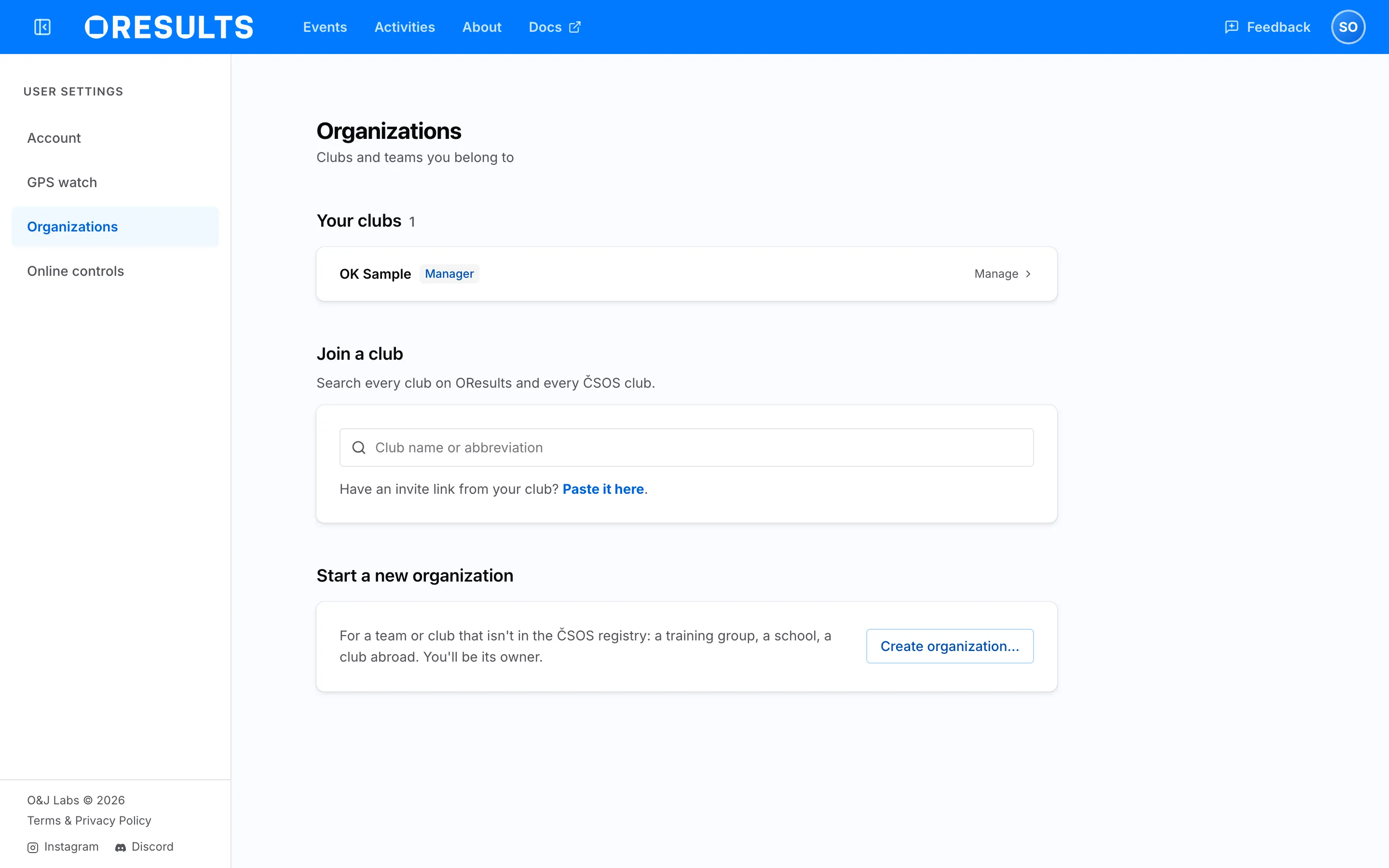
- Open your account menu and choose Organizations.
- Under Join a club, type at least two characters of your club’s name or its abbreviation, and pick your club from the list.
- Choose Request to join. If your account is verified and one of your numbers belongs to this club, the button reads Join followed by the club’s name, and you are a member at once. Otherwise the club shows Request pending until someone who manages it approves the request.
A club listed under ČSOS clubs not on OResults yet is one nobody has created on OResults. Join your club under Troubleshooting covers it.
Join with an invite
Section titled “Join with an invite”- Open the invite link. Logged out, choose Log in or Create account on the invite screen, and OResults brings you back to the invite.
- OResults confirms You’ve joined with the club’s name and opens the club.
With only a code, or a link you cannot open, paste it into Have an invite code? on the Organizations page and choose Join. An invite makes you a member without a request.
Troubleshooting
Section titled “Troubleshooting”Add your registration number
Section titled “Add your registration number”No Verified badge after adding a Czech number: verify your email first, because ORIS is asked only for an account with a verified email, then open your Account page again. If your email is already verified, ORIS did not answer, or the email address it holds for you differs from the one you log in with. Make sure ORIS holds the email address you log in with, then open your Account page again, which asks ORIS once more. Or request to join your club, since a manager approving the request usually confirms your number for that club too.
this registration is already verified on another account: shown under your numbers on the Account page, it means the number is already confirmed on a different OResults account. Log in with that account instead, or choose Disconnect from ORIS on it first.
Czechia is missing from Federation, and the Czech numbers have no Remove: a verified account takes its Czech numbers from ORIS. Open the ⋯ menu on one of your Czech numbers, choose Disconnect from ORIS and confirm with Disconnect. Your Czech numbers are removed with the verification; add a number again whenever you want, which asks ORIS again.
Join your club
Section titled “Join your club”The club is listed under ČSOS clubs not on OResults yet: nobody has created the club on OResults. A ČSOS club is set up only for someone who belongs to it. If your number carries Club leader, choose Create followed by the club’s name to create it yourself. Otherwise choose Ask us to create it, which opens Feedback with the request already written, and send it. We check with the club that you are a member, then set the club up. The button is then replaced by Creation requested with the day you asked, or Creation already requested when someone else asked first.
No matching organization found.: the club is neither on OResults nor a ČSOS club in the registry. Ask whoever runs your club to create it. See Create or claim your club on the Set up your club page.
Request pending does not go away: nobody who manages the club has approved the request yet. Ask a club manager to approve it. Withdraw, beside the badge or on the club’s row under Organizations, takes the request back.
Join with an invite
Section titled “Join with an invite”This invite link is no longer valid: the link has expired, someone revoked it, or the code is incomplete. Check that you pasted the whole code, or ask whoever sent it for a new one.